
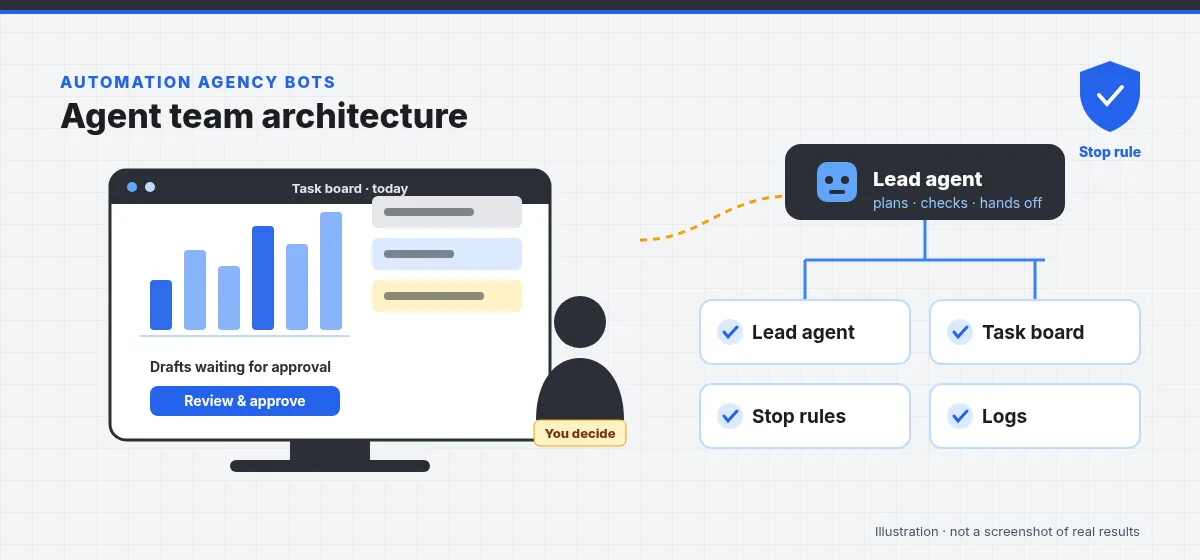
What does an AI agent team look like?
Every team we build, from our in-house 14-bot SEO team to a three-agent finance pilot, uses the same building blocks. The difference is how many specialists there are and which tools they're allowed to touch.
What does the team lead (orchestrator) agent do?
The team lead turns goals and schedules into tasks, assigns them to specialists on the task board, checks completed work against rules, chases anything stuck, and compiles the report a person reads. It doesn't do specialist work itself, and it can't approve risky actions. It routes them to a person.
Why use specialist agents instead of one big agent?
Narrow agents are easier to instruct, test, permission and fix. A reconciliation agent only needs read access to bank exports and the ledger; a WordPress on-page agent only edits specific fields. If one specialist misbehaves, the damage is contained, and you can see exactly which one it was. This is how our SEO team splits work across 14 bots, from rank tracking to schema to page uniqueness.
What is the shared task board for?
The task board is the team's single source of truth: every piece of work is a card with an owner agent, a status, notes, links and, where needed, an approval request. Agents pick up cards on schedule, record what they did and hand off. People can open the board at any time to see what's happening, which is far better than digging through chat histories.
How do agents use tools and connectors?
Agents act through defined tools: read a mailbox, create a draft, query the CRM, write a sheet row, edit a WordPress field, read Search Console, run a Kubernetes command. Each agent gets only the tools and permissions its job needs, through official APIs and connectors wherever possible. That makes their reach explicit and auditable.
What does memory mean for an agent team?
- Approved knowledge: policies, price lists, brand guides, runbooks and FAQs that agents answer and act from.
- Task history: what was done before, by whom and why, kept on the board and in logs.
- Working notes: short-term context for a task in progress.
We keep memory explicit and editable. If an agent "knows" something, you should be able to see where it came from and correct it.
How do scheduled routines work?
Many tasks don't wait for a trigger: daily reports, weekly audits, hourly site and price checks, month-end packs. Scheduled routines start these on time and post results to the board and to chat. Our in-house watch routines check ads, live page prices and site health this way.
Where do human approval gates sit?
Every action a specialist prepares passes a stop rule check. Alone actions (low-risk, reversible) are done, backed up where relevant and logged. Approval actions wait on the board and in chat for a person to approve or reject. Hard stops hand over immediately with the full context. Spending money, deleting data, changing access or DNS, filing returns, hiring decisions and legal positions are always gates or hard stops. Write your own with our stop rule template.
How do logs, backups and reporting keep a person in control?
- Logs: every tool call and action is recorded, with which agent did it, when and why.
- Backups before edits: live systems are backed up before changes; our SEO bots back up WordPress before every edit.
- Change log: human-readable records of what changed, linked from reports, so anything can be rolled back.
- Reports in chat: a daily summary (done, found, changed, waiting for approval, anomalies) where the owner already is, plus a live dashboard where useful.
Which team blueprints do we use?
These are typical compositions. The SEO team is the one we run in-house; the others are example blueprints we adapt per client. They aren't descriptions of client deployments.
SEO team (14 bots)
Team lead · rank tracking · Search Console · GA4 · on-page & schema · internal linking · backlinks · local SEO/GBP · AEO/GEO · technical indexing · page uniqueness · Google Ads · Facebook Ads · GMB. Details
Back-office finance team
Team lead · document intake · PDF extraction · bookkeeping entries · bank reconciliation · GST data prep · collections reminders. Gates: posting entries, invoices. Hard stops: payments, filing. Finance ops
Recruitment team
Team lead · application intake · screening summaries · interview scheduling · candidate comms · onboarding checklist. Hard stops: hire/reject decisions, salary, grievances. HR & recruitment
Sales research team
Team lead · 3–6 parallel research agents · verification agent · CRM enrichment · pipeline reporter. Gates: outreach, bulk CRM updates. Sales ops
Site ops team
Monitor (read-only) · backup · diagnosis · runbook recovery · reporter. Hard stops: deletions, DNS, access. Details
Executive assistant team
Chief-of-staff lead · inbox triage · calendar · follow-up tracker · documents. Gates: sending email, accepting meetings. Admin & EA
How do we start building a team for you?
Never with 14 bots. We start with one workflow and two or three agents (often a specialist, a reporter and the team lead), write the stop rule, run it with your review, and add specialists once the first ones are trusted. See the pilot process and how we price.